
How to Choose Your Google Business Profile Category Step by Step

Summarize with AI

Before you start
This is the process I use to choose the GBP categories of any business. It runs in 11 steps, and you will see them applied to a real Miami profile that ranks well and still declares categories its public information does not support. You will see what it has too much of, and what it is missing.
What do you need to do it yourself? Two hours, a spreadsheet, and a tool that reveals the hidden categories of any profile. I use GMB Everywhere and PlePer because they are free and I work with them daily. Any other tool works. They all draw on the public data of the profiles, and they differ mostly in how they collect and present it.
What decides the choice is your judgment about the business.
The 11 steps to make those decisions
Step 1: Write down what the business actually does, before looking at anyone else
The action. List the real services of the business, before you open Google Maps.
How. Almost every guide starts by spying on the competition. That order contaminates the decision from the first minute.
Write the list of services and mark which ones are standalone service lines, meaning what a customer can hire on its own, with its own price and its own process.
The rest are tasks inside another service. Things you do while delivering a larger service, and that nobody hires separately.
Vacuuming a rug while you clean a house is a task. Washing it with shampoo, steam extraction, and stain removal is a service the customer pays for on its own.
That distinction will settle half the audit, so it is worth arguing with yourself about it for a while.
Then answer three questions: why most customers come, which activity generates most of the revenue, and how you would describe the business using a single word.
You are done when you have two separate lists, services and tasks, and you can point to the core activity without hesitating.
Step 2: Install GMB Everywhere
The action. Install the extension that reveals the hidden categories of any profile.
How. Google Maps shows the primary category in the listing. The additional ones stay hidden.
GMB Everywhere is a free Chrome extension that reveals them right on the map. You install it from the extension store and it appears inside the results without any setup.
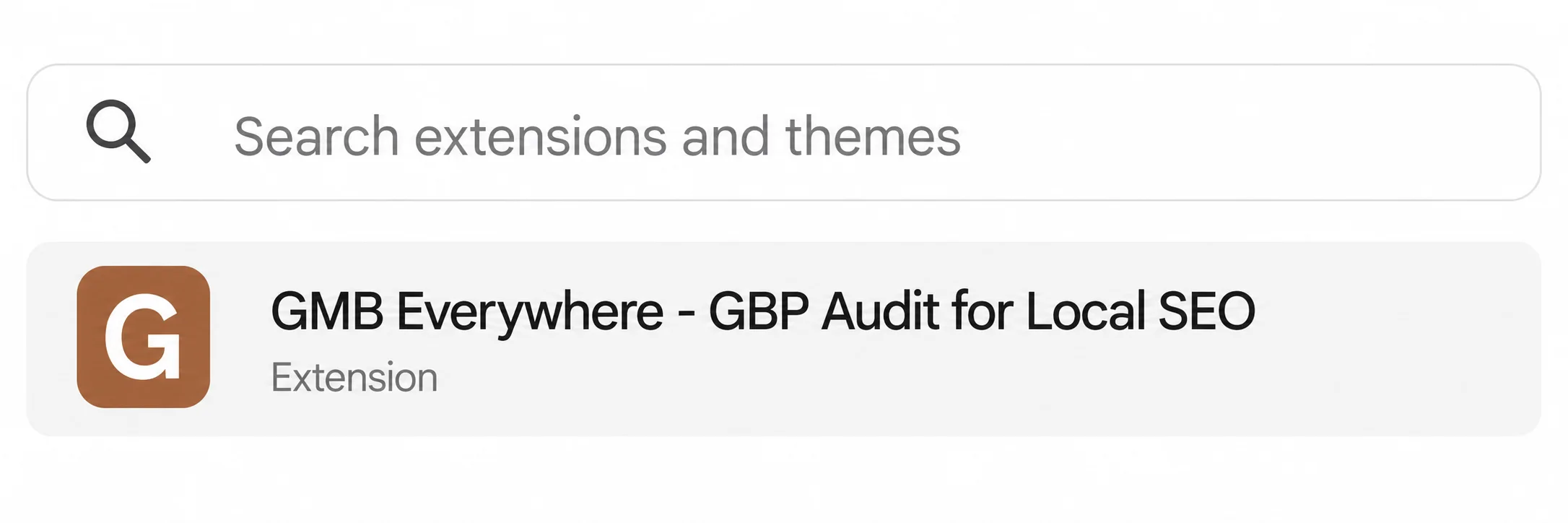
And there you see something worth being clear about from the start. A dozen extensions do this same job, and they all read the same source. Pick one, install it, and move on.
One warning that applies to all of them: they show you data and they do not make decisions.
You are done when you search any business on Google Maps and see a label under its name with its primary category and the additional ones.
Step 3: Search Google Maps the way your customers search
The action. Run between three and five different searches, from the area where the business actually competes.
How. Search service plus city, then repeat with other ways of saying the same thing. For a cleaning company in Miami, the queries would look like these:
- house cleaning miami
- cleaning service miami
- maid service miami
- residential cleaning miami
Use several keywords because the competitors change with the query. And do it from the real competition area, since local results depend on where you are.
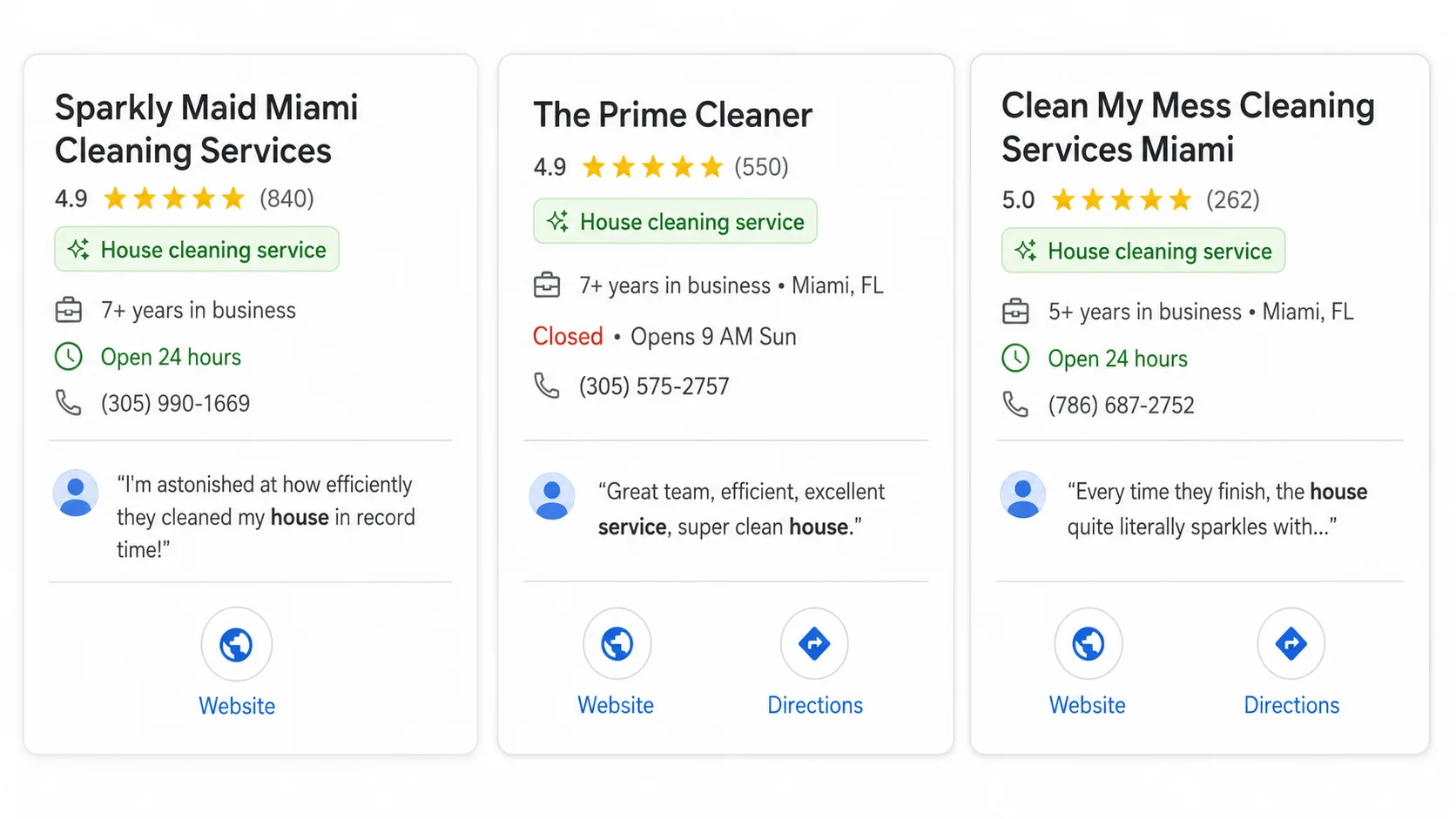
Notice what you can already read without installing anything: the primary category appears under each business. All three in the Local Pack use "House cleaning service". That pattern is your first signal.
Analyze between 10 and 20 profiles. With fewer, the pattern you see could be a coincidence.
You are done when you have at least three result lists and you notice the profiles changing from one search to another.
Step 4: Record the categories in a table
The action. Log what you find, with two columns of judgment.
How. As you review the profiles with GMB Everywhere, fill in a sheet like this:
| Position | Business | Primary category | Additional | Comparable? | Applies to me? |
|---|---|---|---|---|---|
| 1 | Competitor A | House cleaning service | Carpet cleaning, janitorial | Yes | Yes |
| 2 | Competitor B | Property management company | House cleaning | No | Not as primary |
The last two columns do the work. A business can show up in your search without being your competitor, and a category can work for someone else without belonging to you.
It comes with the three sheets of the process ready to fill: your real services, the competitor table, and the final decision with its evidence. Download template
You are done when every row has the last two columns marked, and you can say out loud why a given competitor is not comparable.
Step 5: Cross-check with PlePer
The action. Cross your findings with a second tool that uses a different method.
How. GMB Everywhere shows you what you see on the map, from where you are. PlePer answers a different question, which is why it pays to use both.
Its Category Helper asks for the business name and up to three keywords. It crosses that with the profile coordinates and returns three columns: every category used by the analyzed businesses with its usage percentage, the categories you are supposedly "missing", and your current categories.
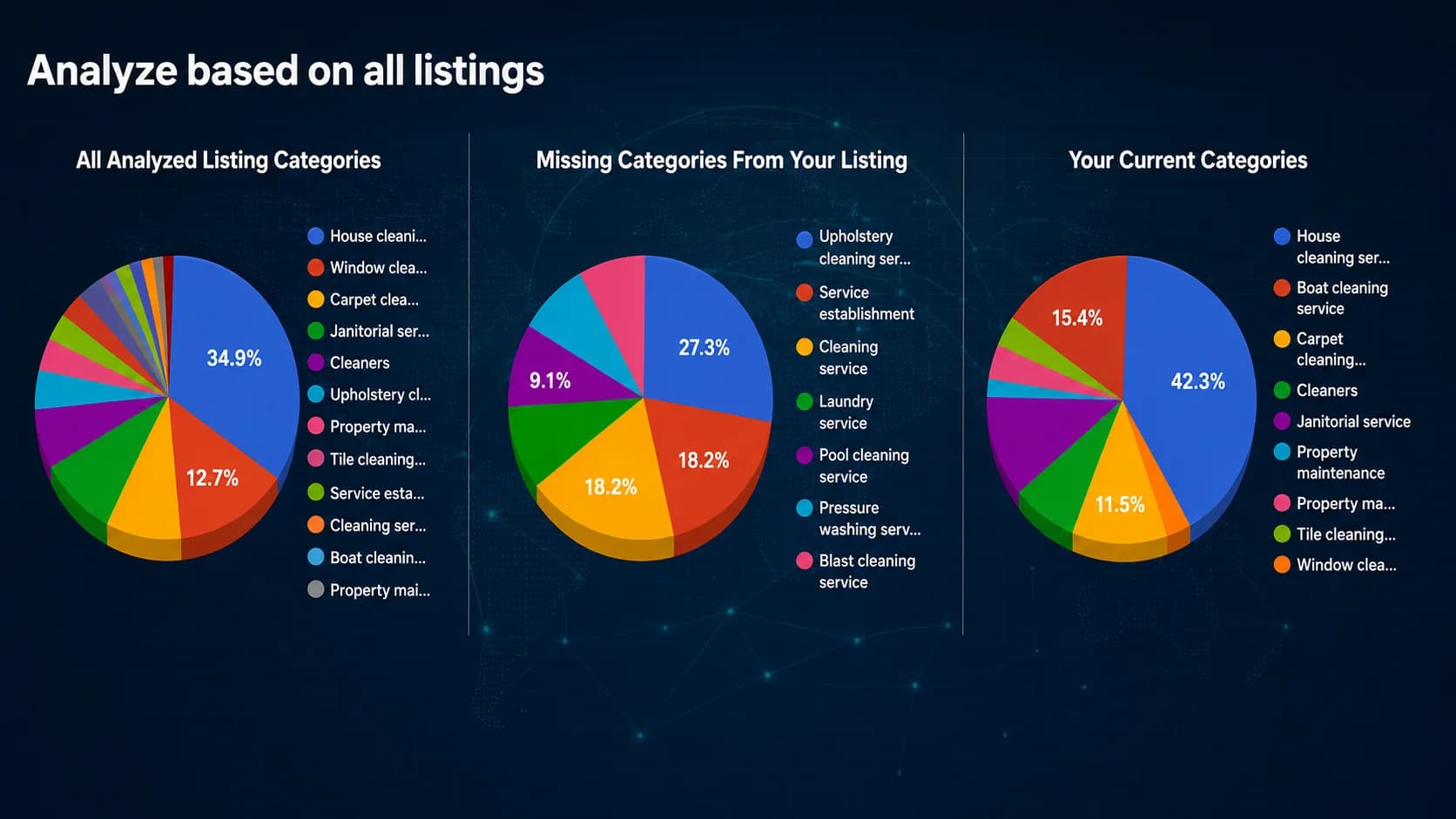
The percentages matter a lot, and in step 7 you will see why.
Its second tool is the full list of official categories, filterable by country and language. This one carries the most value, even though it looks like the least exciting.
Open it and search every category containing a word from your industry. You will find options you have never seen, because Google only suggests a handful while you type in the field.
That is where the more specific category none of your competitors is using may be hiding.
You are done when you have the three Category Helper columns and a list of the categories in your industry that exist in the catalog, including the ones you did not know about.
Step 6: Filter what you found against what the business actually does
The action. Discard every category the business cannot prove.
How. This step separates an audit from a copy. And here is where the real case comes in.
In July 2026 I audited the profile of Miami House Cleaning, a cleaning company with almost 70 reviews and 4.9 stars. A solid business, well rated, with an extensive website.
And here is the interesting part: it ranks well. It shows up fourth on Google Maps for "house cleaning in miami", among businesses with hundreds of reviews.
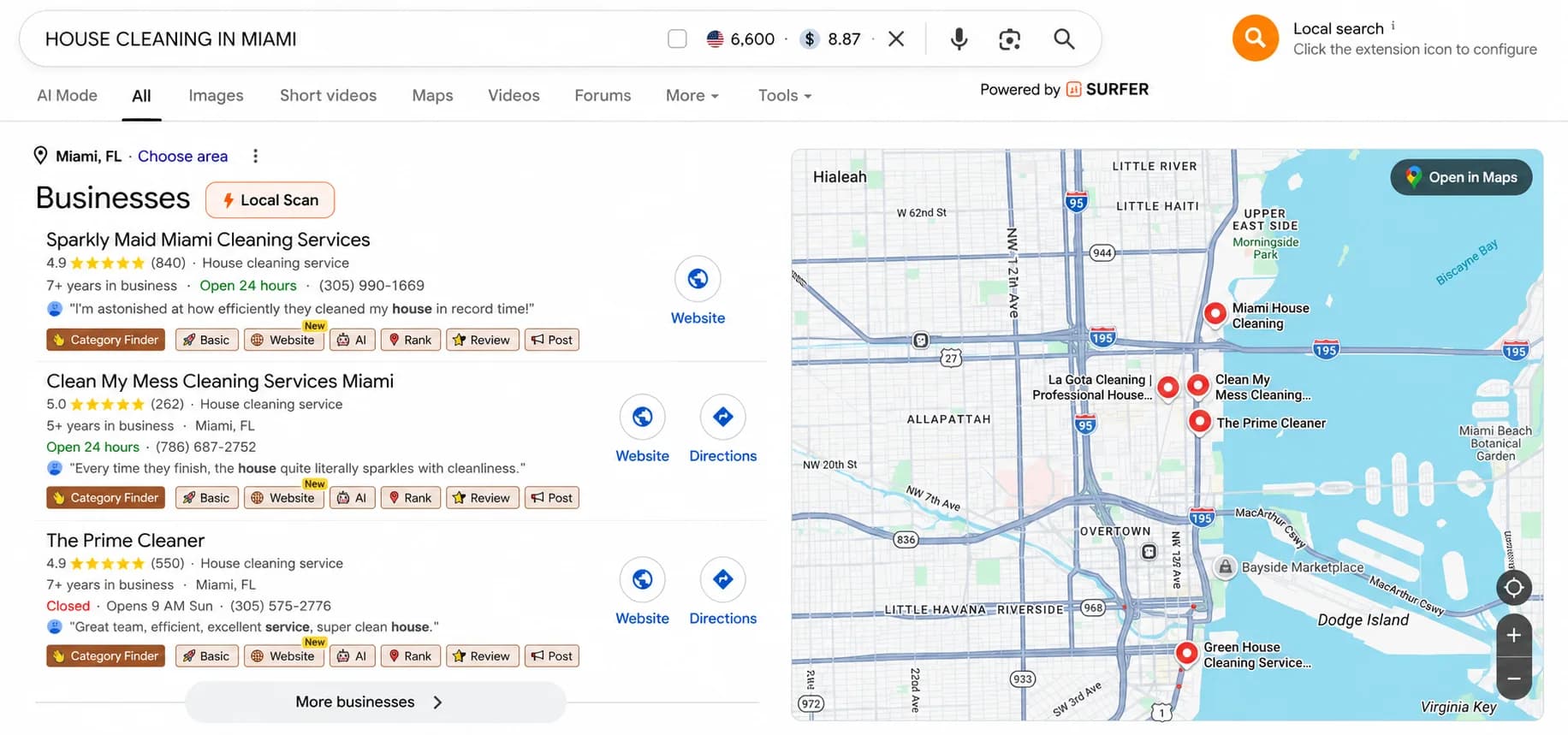
A profile can rank on proximity, reviews, or age, and still carry a category setup that fails to describe the business. Those two things coexist perfectly.
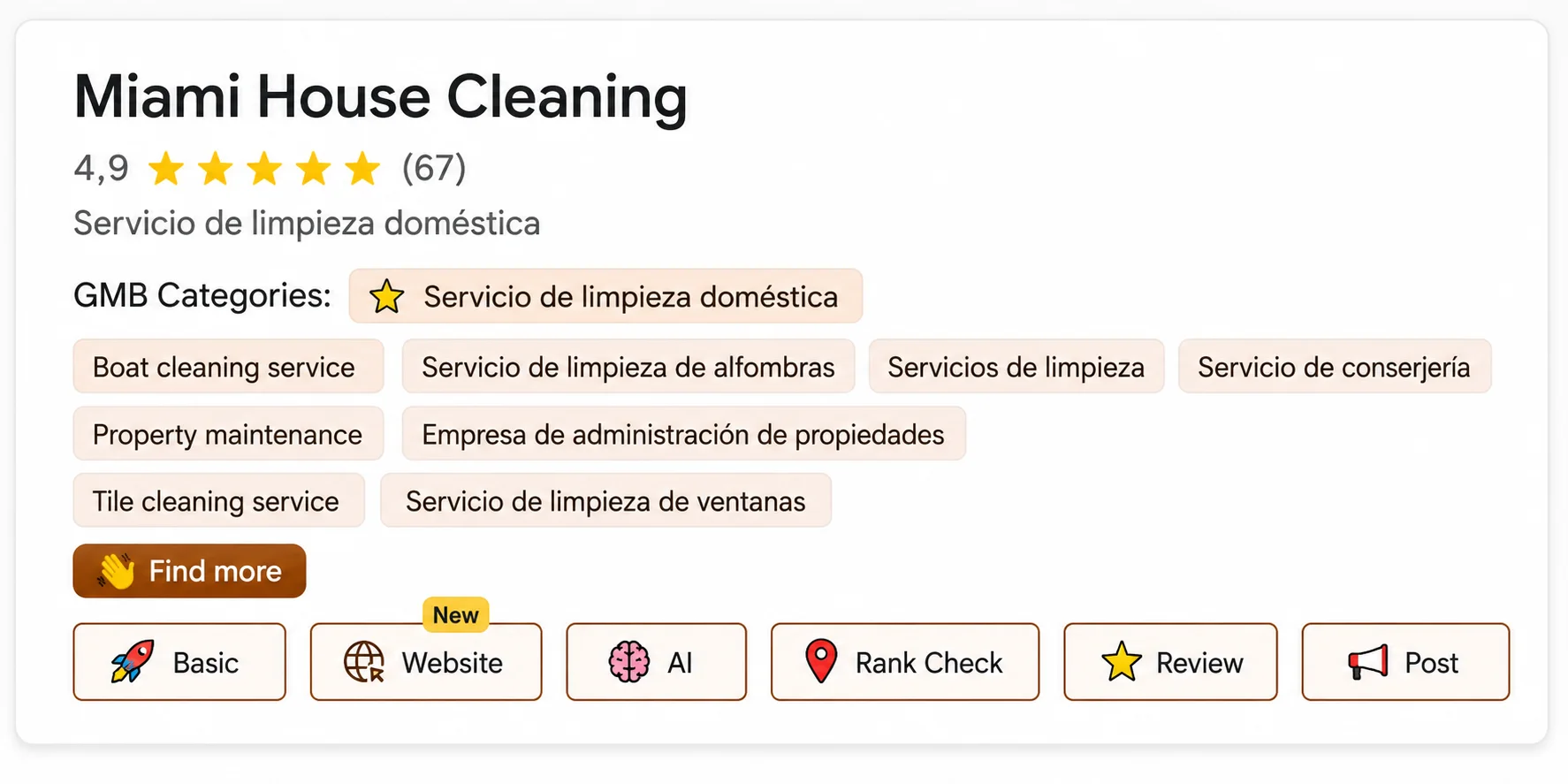
Its categories on Google. Primary: house cleaning service. Additional: boat cleaning service, carpet cleaning service, cleaners, janitorial service, property maintenance, property management company, tile cleaning service, and window cleaning service.
Its real services, according to its own website. House cleaning, deep cleaning, office cleaning, janitorial, Airbnb and vacation rental cleaning, move-in and move-out, maid service, post-construction cleaning with dedicated pages for contractors, designers, and builders, and new construction cleaning.
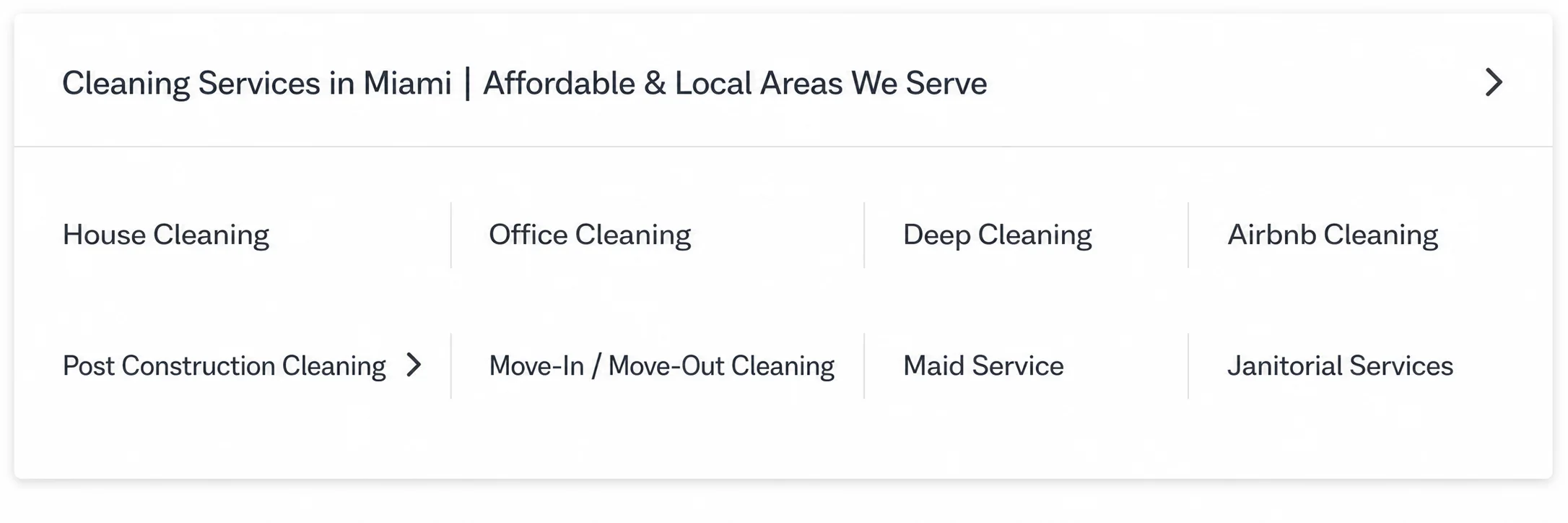
Now compare the two lists.
Boat cleaning service. I found no public evidence of this service: it appears nowhere on their website, in their service menu, or in their reviews. A category like this gets confirmed with the business before removing it, and the burden of proof sits with whoever declares it.
Property management company. This is the most interesting error in the whole audit. Its website says they work with property managers and with vacation property managers. They clean for them.
Someone confused "I work for property managers" with "I am a property management company". Serving a type of client does not turn you into that type of business.
Carpet cleaning service. Here the distinction from step 1 comes back. Its website says they vacuum carpets and rugs while cleaning the house. A competitor of theirs offers carpet cleaning with shampoo, steam extraction, and stain and odor removal, as a service you can book. That one is a carpet cleaning service.
The gray zone, where judgment shows up
Two categories stay open for debate, and they teach more than the obvious discards.
Window cleaning service. They do clean windows, inside the office cleaning package and as an add-on in post-construction work.
Tile cleaning service. Their deep cleaning includes scrubbing tile and grout.
In both cases the cleaning exists, as a task inside another service.
My rule for settling it: if a customer cannot hire you for that alone, you are not that. Nobody calls this company to have only their windows cleaned.
This setup is very common and the error is understandable. Nobody adds categories in bad faith. They get added because they sound related, which is exactly what I did when I started.
You are done when every category on your list has concrete evidence beside it: a web page, a license, a professional on staff, or a review that backs it up.
Step 7: Ignore the "missing categories" column
The action. Review the tool's suggestions and discard the ones that do not apply.
How. When I ran Miami House Cleaning through PlePer's Category Helper, the tool filled an entire column with categories it claimed were missing:
- Upholstery cleaning service
- Pool cleaning service
- Laundry service
- Pressure washing service
- Blast cleaning service
None of those five services exists in the business. Upholstery only gets vacuumed, pools fall outside their offering, and pressure washing and blast cleaning never appear anywhere. Laundry shows up only as an optional extra inside the Airbnb cleaning.
So why does the tool suggest them?
Look at the percentages the tool itself reports. Pool cleaning: 1.59%. Laundry: 1.59%. Pressure washing: 1.59%. Blast cleaning: 1.59%.
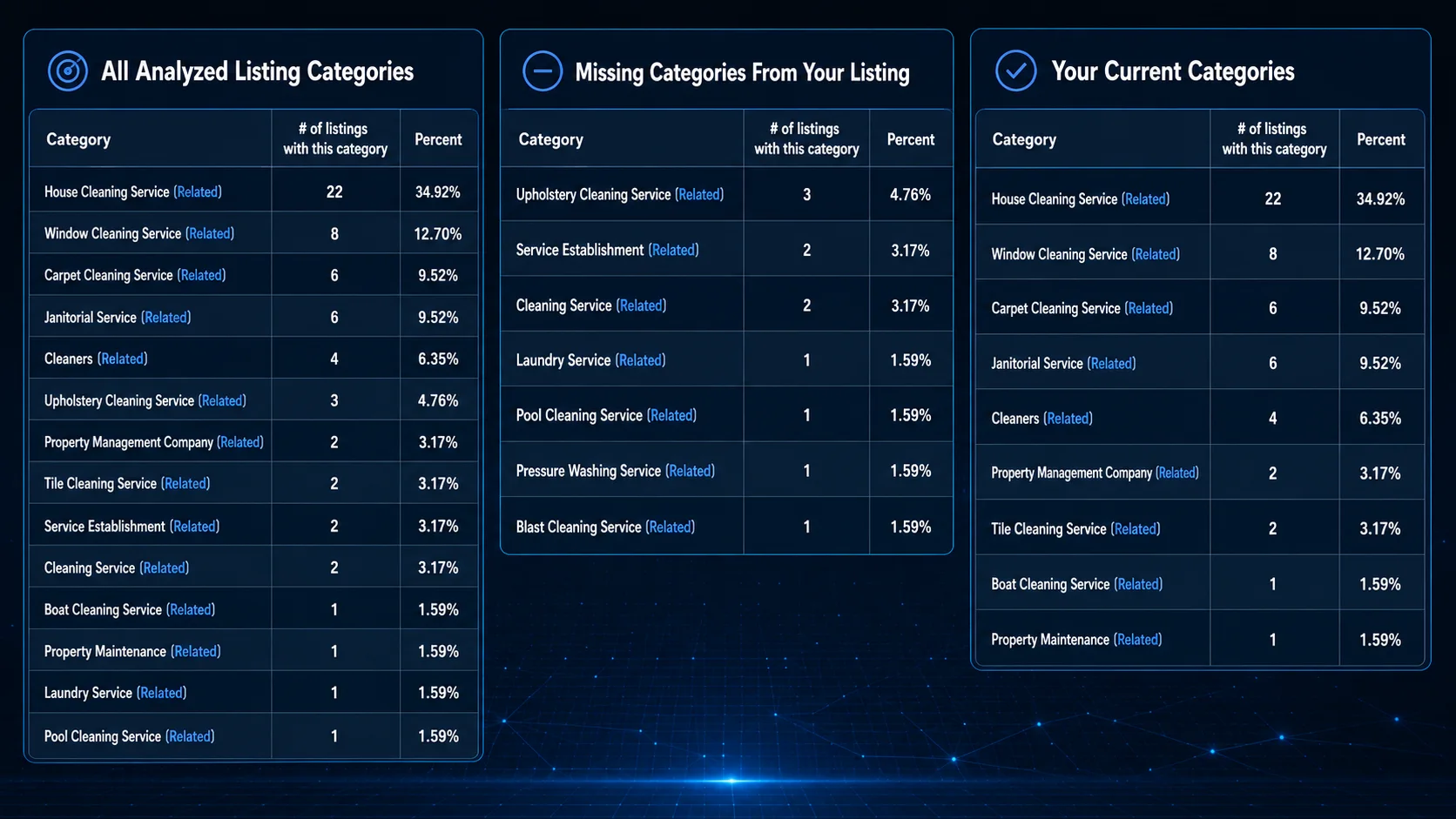
That means a single business, out of all the ones analyzed, holds each of those categories. One.
The tool compares your profile against the market and flags as missing anything someone else has and you do not. It works on counts, without knowing what your company does.
Follow that column blindly and you end up adding five categories you cannot prove. You will have handed Google five wrong signals about what your business is.
You are done when you can justify, service by service, why you rejected each of the tool's suggestions.
Step 8: Look for the categories you actually need, and the ones that do not exist
The action. Identify the real services you have not declared, and check whether Google has a category for them.
How. You already know which categories you have too many of. Now find the ones you are genuinely missing.
Miami House Cleaning has three real business lines it never declares. Post-construction cleaning, with three dedicated pages. Office and commercial cleaning, with plans by office size. Airbnb and vacation rental cleaning, with express turnover.
I went to PlePer's full category list to find them. And here is the finding I did not expect.
Google has no category for any of the three. The entire catalog, filtered by the word "cleaning", returns 16 categories. None of them covers post-construction, commercial, or vacation rental cleaning.
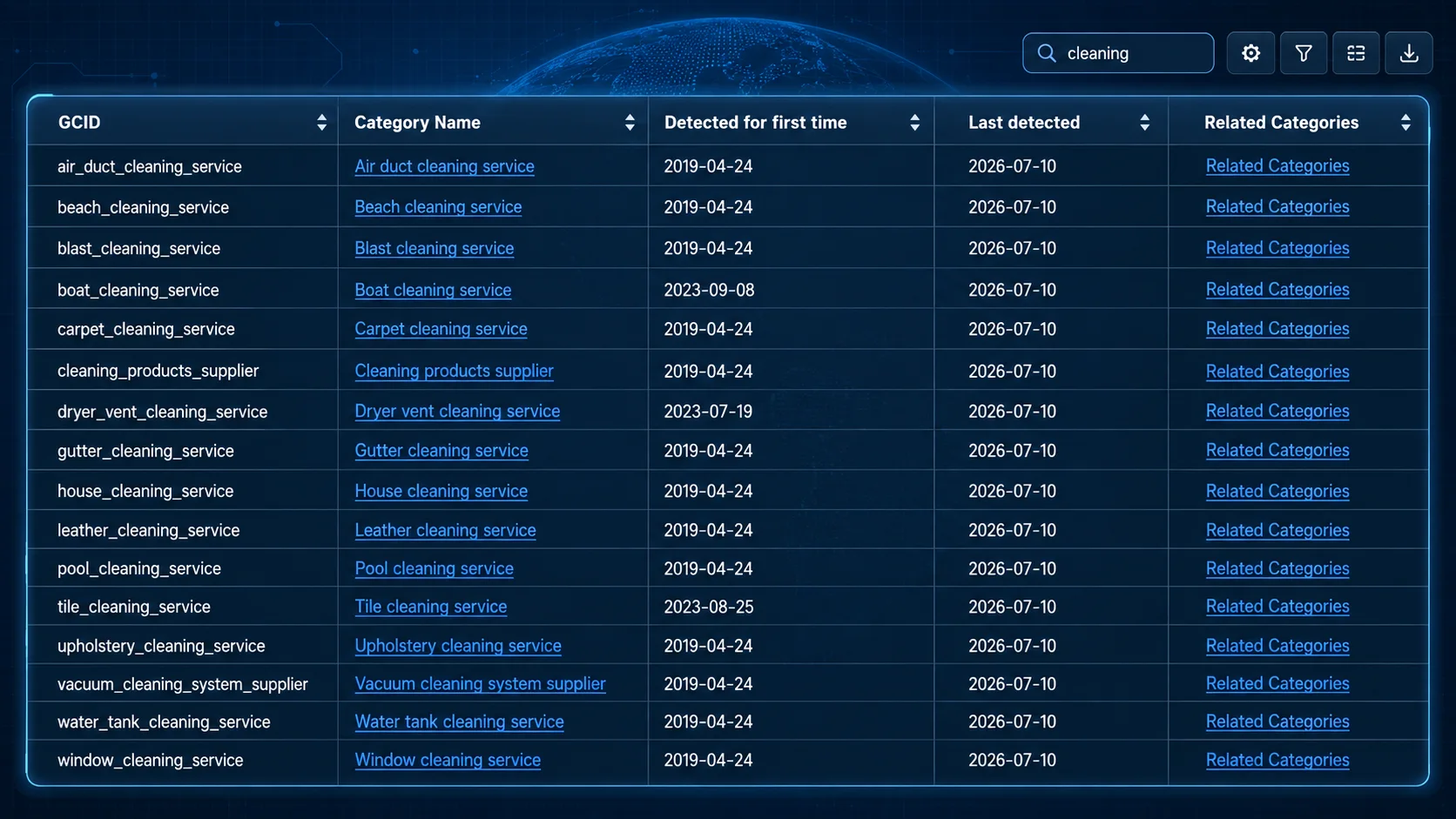
Google's catalog runs to around 4,000 options and changes every month, and it still fails to cover everything a business can do.
So this company's situation is doubly ironic. It carries four categories it cannot prove, and three genuine business lines Google will not let it declare.
What to do when the exact category does not exist
When the catalog falls short you have three ways out, and inventing a nearby category is none of them.
Pick the closest category that is true. For office cleaning, janitorial service covers a good part of that intent, and it is real.
Use the services section of the profile. GBP lets you add services as free text, including custom ones. There you can write "post-construction cleaning" and "Airbnb turnover cleaning".
Develop the website. Miami House Cleaning does well what Google will not let it do inside the profile: it has dedicated pages for each of those services.
You are done when every real service has an official category assigned, or a note explaining why none exists and where you plan to declare it instead.
Step 9: Decide which category will be the primary
The action. Pick one single category, the one that defines the identity of the business.
How. Google recommends choosing the most specific category that describes the business as a whole, and using few categories rather than turning them into a list of every service.
When several are correct, the primary has to combine five things: the core activity, specificity, search intent, commercial priority, and provable reality.
Accuracy outranks everything else. An inaccurate category stays inaccurate even when it looks more profitable.
There is a way of framing this problem that I find the best I have read. It comes from Krystal Taing, Global Director of Pre-sales Solutions at Uberall and Google Business Profile Platinum Product Expert.
Picture a gym with a pool and a sauna. If it sets "Sauna" as its primary category, people searching for a sauna will find it and show up. And once there, they discover they need a gym membership.
The business operates as a gym that happens to have a sauna.
A case where two categories looked equally valid
My first serious local SEO client was an English and citizenship school in Miami. It also offered immigration assistance and legal services through an immigration attorney.
Auditing its competitors, I found three groups: non-governmental organization, education categories, and immigration services.
Many competitors used "Non-governmental organization". The client was not one, so copying it would have described the business wrong.
The real debate came down to education versus immigration. This was the decision:
| Function | Category |
|---|---|
| Primary | Immigration and naturalization service |
| Additional | Legal services |
| Additional | Adult education school |
| Additional | English language school |
The primary captured the combination of core activity, delivered services, and priority search intent. The other three described real lines, backed by the classes, the adult audience, and the attorney.
The profile ended up ranking well for almost all of its main searches. The change was part of a broader local SEO strategy, so attributing the whole result to the categories would be careless.
You are done when you can complete this sentence without hesitating: "This business is a ______", and that word matches an official category in the catalog.
Step 10: Add only the additional categories you can defend
The action. Build a short list of additional categories with evidence behind them.
How. Google allows one primary and up to nine additional. That limit is a ceiling, and filling it completely was never the goal.
A category study from BrightLocal, published in 2023, found that profiles with four additional categories showed the best average map ranking, at 5.9.
The same study carries the nuance almost nobody quotes. Law firm profiles got their best average ranking with a single additional category. And electricians with five or more recorded the worst average ranking in the entire study, at 7.9.
In other words, the same data used to justify "add four" also shows that piling on categories can make things worse. It is a correlation observed within a sample, with the limits that implies.
Before adding an additional category, answer four questions:
- Does it represent a real, bookable activity?
- Can I prove it with the website, the staff, the licenses, or the reviews?
- Is it important inside the business?
- Would I choose it even if no competitor used it?
If the answer depends on "sort of" or "it sounds related", it probably does not belong.
I have a shorter rule: if I need to write a whole paragraph to justify a category, I already know it does not fit.
You are done when every additional category on your list passes all four questions with a clean yes.
Step 11: Save the baseline and apply the change
The action. Document the current state before touching anything, then edit the profile.
How. Before changing a single category:
- Screenshot the current category setup.
- Write down the date.
- Record current positions for your main searches, from several points across the city.
- Save the calls, messages, and direction requests from the last month.
Then open "Edit profile" and modify the primary and additional categories.
Google warns that adding or editing categories can trigger a new verification request. Sterling Sky recommends being ready for that reverification even when adding a single additional category.
Avoid changing other sensitive data the same day. Touch five things at once and you will never know which one moved the needle.
You are done when the profile displays the new categories and you have the screenshot of the previous state saved with its date.
Common sense does most of the work
Eleven steps, two tools, one spreadsheet. And in most cases you will end up where you started.
A nail salon is a nail salon. An English school is an English school. A company called Miami House Cleaning that cleans houses is a house cleaning service. The owner knew that from day one, and no tool was going to reveal it.
So what was the process for?
For three concrete things, and all of them matter.
It showed you the full catalog. You discovered categories that existed and you had never seen, and confirmed that others you took for granted do not exist.
It gave you the exact name. Google names things the way Google wants, and knowing the official label changes what you can select.
It forced you to prove every category. The filter against real services is what stops you from adding options because they sound related.
What the process never did was make the decision for you.
And here is where the trap sits. You do not need the most expensive or the most sophisticated tool. GMB Everywhere, GMBspy, PlePer, and the paid platforms all draw on the same public profile data. They differ in how they group and present it, and none of those differences will decide your category.
Two people can look at the exact same screen, with the same percentages and the same suggestions, and one chooses well while the other fills the profile with categories they cannot defend. The difference lies in knowing the business.
When a tool suggests a category your common sense rejects, listen to your common sense. You know the business. The tool counts profiles.
And when the analysis confirms what you already thought, that is a result too. You move forward knowing you reviewed the market before deciding, instead of having gambled.
After the change: what to measure and for how long
The work does not end when you save. This is the part almost nobody does, and it is the one that tells you whether you got it right.
The first 48 hours. Check that the profile is still published and that Google did not request reverification. If it did, complete it right away, because a suspended Google Business Profile does not show up.
The first two weeks. Review which new queries are bringing people to the profile, inside the Google Business Profile insights. A new primary category usually shifts the set of searches Google considers you relevant for. That movement in the queries shows up before any movement in the rankings.
Between four and eight weeks. Measure positions again from the same points across the city you used as your baseline. Compare calls, messages, and direction requests against the previous month.
Local results vary with proximity, competition, time of day, and other signals. Do not change the category again because one keyword moved two spots in three days.
And if you touched several things on the profile at once, the improvement cannot be credited to the category alone. That is honesty, and it is also what lets you actually learn.
Every six months. Review the catalog. Google adds, renames, and removes categories often. A more specific option that describes the business better may exist now.
Your category also decides what you can do with the profile
The primary category enables specific features inside the profile. Choose wrong and you can lose tools you assumed came standard.
According to Krystal Taing, Global Director of Pre-sales Solutions at Uberall and Google Business Profile Platinum Product Expert, the category can determine features such as:
- The food menu, available to restaurants.
- The service menu, available to service businesses.
- The booking or appointment button.
- The attributes you can declare on the profile.
Other elements, such as displaying the physical address or publishing hours, also depend on the operating model of the business and on the rules Google applies to each type of establishment. The category has influence there, and it does not settle everything on its own.
Some categories also carry stricter verification, in sectors where spam runs high, such as locksmiths and garage door repair. There, even a small edit can trigger reverification.
One more thing, which explains a frequent confusion. Google can dynamically display one of your additional categories instead of the primary one, when that additional fits the query better. That is why you sometimes see one category on the map and a different one when you open the profile.
Now that you have chosen, this is why it mattered so much
With the decision made, the theory lands better.
In the Local Search Ranking Factors 2026 report by Whitespark, published in November 2025 and built from the assessment of 47 specialists, the primary category appears as the single most important factor for ranking in the Local Pack. Additional categories come in eighth.
The sources deserve careful separation. Google explains how categories work and recommends choosing the most specific one that describes the business as a whole. The one placing the primary category as factor number one is Whitespark, drawing on the opinion of industry experts.
That report represents a professional consensus, backed by the experience of many people who measure this daily. It is solid evidence, and it works differently from a direct confirmation of the algorithm.
What we do know with certainty is simpler. Google uses the category to understand what kind of business it is looking at, and which searches it can consider you relevant for. A wrong category makes it harder for Google to connect your profile with the queries that matter to you.
That is why completing your hours, your photos, and your description will never make up for a badly chosen primary category.
It also explains why your category matters most on mobile: on a phone the local pack takes up most of the first screen, so the category decides whether you appear at all before your website gets a chance to say anything.
The most common mistakes when choosing categories
- Adding every option that sounds related.
- Copying the best ranked competitor without checking whether they are comparable.
- Confusing a service with a category.
- Confusing a task inside a service with a service of its own.
- Confusing the type of client you serve with the type of business you are.
- Blindly following a tool's "missing categories" column.
- Choosing a general category when a specific and truthful one exists.
- Filling all nine slots out of obligation.
- Changing the primary every time a keyword moves.
- Analyzing a single keyword.
- Forcing the categories to fit a badly structured website.
- Assuming that a correlation proves causation.
Frequently asked questions about Google Business Profile categories
How many categories does Google Business Profile allow?
One primary category and up to nine additional ones.
What do I do if no exact category exists for my service?
Pick the closest category that is true, describe that service in the profile's services section, which accepts free text, and develop it with a dedicated page on your website.
Should I copy the categories of the competitor ranking first?
No. Analyze them to discover possibilities, then check whether they describe your business. That competitor may rank on proximity, authority, reviews, or age, even with an imperfect setup.
Do additional categories help with ranking?
They can broaden relevance for related searches when they represent real activities. In the Whitespark 2026 report they appear as the eighth most important Local Pack factor.
Should I use all nine slots?
No. The maximum is a ceiling. The BrightLocal study shows that in some sectors, piling on categories worsens the average ranking.
Can I change the primary category later?
Yes, from "Edit profile". Google warns that doing so can trigger a new verification request, so it pays to be ready before you touch it.
How long does a category change take to show results?
The queries your profile appears for usually move before the rankings do. Give it between four and eight weeks before drawing conclusions, and always compare against the baseline you saved.
Does the category affect anything beyond ranking?
Yes. It can influence which features and attributes are available, including service menus, booking options, and category-specific attributes. Address visibility and business hours also depend on the business model and on Google's eligibility rules.
Google needs a clear definition of your business
The whole process fits in two sentences.
Tools show you the market and the catalog, and any of them does that job. The services your business genuinely delivers decide which categories you can use.
That second part is the one that cannot be automated. No tool knows your business better than you do, and none of them will decide for you.
If the analysis ends up confirming what you already knew, the work was still worth it. You decided with the market and the catalog in front of you, instead of having gambled.
Your next step is concrete: open your profile, look at your primary category, and ask yourself whether it describes what the business is or what you wish it were.
Sources consulted
- Whitespark, Local Search Ranking Factors 2026
- BrightLocal, Google local algorithm and ranking factors
- Sterling Sky, how to choose the best GBP category
- PlePer, GMB Category Helper
- PlePer, full list of GBP categories
- Google Business Profile Help, manage your business category
The Miami House Cleaning analysis was performed in July 2026, using public data from its Google Business Profile and its website. The categories on a profile can change at any time.
Need help with your Google Business Profile categories?
If you suspect a wrong setup is limiting your presence on Google Maps, we review your profile, your competition, and the signals that may be holding back your visibility.