
How to Use UTM Parameters (And the Naming Convention That Keeps Reports Readable)

Summarize with AI

The five parameters
| Parameter | What it holds | Required | Example |
|---|---|---|---|
| utm_source | Where the link lives | Yes | facebook, newsletter, partner-site |
| utm_medium | The type of traffic | Yes | cpc, email, social |
| utm_campaign | Which effort this belongs to | Yes | spring-promo-2026 |
| utm_content | Which link, when there are several | No | header-button, footer-link |
| utm_term | The keyword, for paid search | No | emergency-plumber |
A finished URL looks like this:
https://tamer.marketing/contact/?utm_source=newsletter&utm_medium=email&utm_campaign=august-2026
Build them with the Google Campaign URL Builder rather than by hand. It handles the encoding and you will make fewer typos, and typos in UTMs are permanent: a link that went out to 4,000 people with utm_medum cannot be fixed after the fact.
The rule that breaks most setups
Here is the thing that separates a working setup from one that produces a report nobody can use.
utm_medium is not a free text field. GA4 sorts traffic into default channel groups by matching the medium against a fixed list. Put something it does not recognize and your traffic lands in Unassigned, which is the analytics equivalent of a shrug.
These are the values that work:
| Use this medium | GA4 puts it in | Use it for |
|---|---|---|
| organic | Organic Search | Unpaid search (set automatically, do not tag) |
| cpc | Paid Search / Paid Social | Any paid click. Also accepts ppc, paid, retargeting |
| Newsletters, sequences, one-off sends | ||
| social | Organic Social | Unpaid posts. Also accepts social-network, social-media |
| display | Display | Banners. Also accepts banner, cpm, interstitial |
| affiliate | Affiliates | Affiliate and partner links |
| referral | Referral | Links from other sites you control |
Notice what is missing: facebook, instagram, newsletter, qr-code, linkedin. Those are sources, not mediums, and putting them in the medium field is the single most common UTM mistake we see.
The rule to hold on to: source is the specific place, medium is the category. utm_source=instagram&utm_medium=social is right. utm_source=social&utm_medium=instagram is backwards and will make a mess that takes months to notice.
The naming convention
Most guides tell you to be consistent and then leave you to invent the system yourself. Here is ours. Adopt it, change it, or adopt something else, but write it down before the first link goes out.

Rule 1: everything lowercase, always.
GA4 is case sensitive. Facebook and facebook become two separate rows in every report forever, splitting your numbers in half. There is no way to merge them retroactively.
Rule 2: hyphens between words, never spaces or underscores.
spring-promo-2026, not spring promo 2026 and not spring_promo_2026. Spaces get encoded as %20 and look broken in reports.
Rule 3: utm_source is the platform, not the campaign.
Approved list, extend as needed:
facebook · instagram · linkedin · youtube · tiktok
google · bing
newsletter · lifecycle · transactional
print · billboard · vehicle · flyer
partner-[name]
Rule 4: utm_medium only ever comes from the table above.
No exceptions. This is the field with rules attached.
Rule 5: utm_campaign follows year-month-descriptor.
2026-08-summer-hvac
2026-q3-brand-awareness
2026-08-newsletter
Leading the name with the date means campaigns sort chronologically in every report, which is the single best quality-of-life improvement in this whole system.
Rule 6: utm_content describes the placement, not the creative.
header-cta, footer-link, image-1, bio-link. This is how you tell which of the three links in the same email got clicked.
Rule 7: keep the list in one shared document. A pinned spreadsheet with the approved values, visible to everyone who sends a link. The convention only works if the person building a link on a Friday afternoon can check it in ten seconds.
Tag your offline channels too
This is the part almost nobody does and it is where the convention earns its keep.
A billboard, a flyer, a vehicle wrap and a QR code on a receipt can all carry a tagged destination:
tamer.marketing/contact/?utm_source=billboard&utm_medium=referral&utm_campaign=2026-08-palmetto
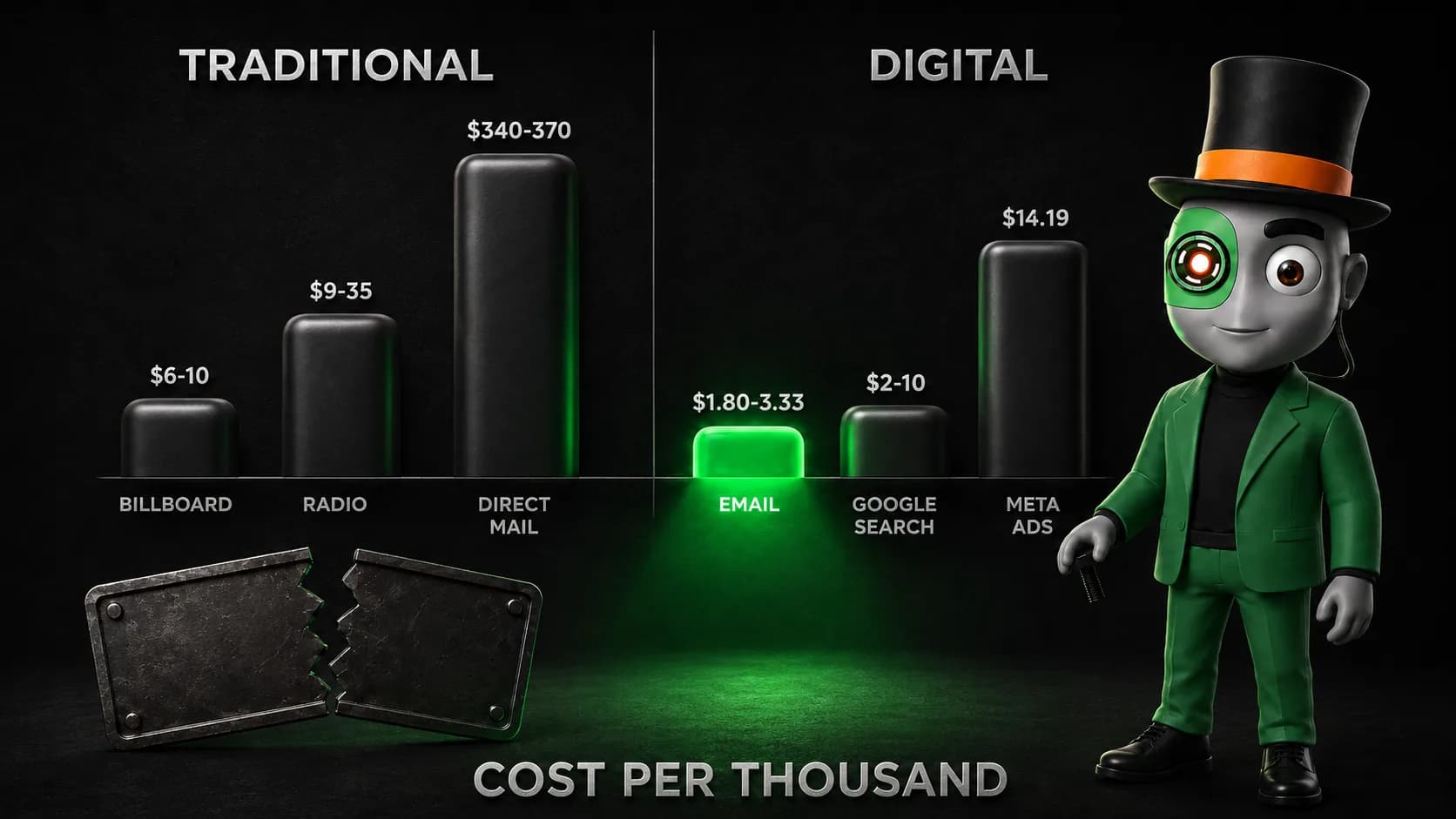
Use a short vanity URL that redirects to the tagged one, so the printed version stays readable. Now your billboard produces a row in the same report as your Google Ads, which is the only way to compare them honestly. We made that argument with the actual numbers in our piece on how traditional and digital channels compare on cost.
Without this, offline channels get judged on feel while digital gets judged on data, and the comparison is rigged before it starts.
The mistake that corrupts your data
Never put UTM parameters on internal links.
A link from your own blog post to your own contact page with utm_source=blog on it does something destructive: GA4 sees a new campaign source mid-visit and starts a new session, wiping the original attribution.
The visitor who arrived from your newsletter and clicked one internal tagged link is now recorded as two sessions, and the conversion gets credited to blog instead of newsletter. Do this across your site and your channel report becomes actively misleading rather than merely incomplete.
Internal navigation needs no tags. GA4 already tracks it. If you want to know which internal link people click, use event tracking, not UTMs.
Common questions
Are UTM parameters case sensitive?
Yes. Facebook, facebook and FaceBook become three separate entries in your reports and cannot be merged afterwards. Lowercase everything, without exception.
Do UTM parameters hurt SEO?
Not if used correctly. They create URL variations, which is why you should never use them on internal links or on anything you want indexed. Keep them on inbound campaign links only, and make sure your canonical tags point at the clean URL.
Should I tag internal links?
No. It resets the session and destroys the original attribution. This is the most damaging UTM mistake and it is very common.
Why is my campaign showing as Unassigned?
Almost always because utm_medium contains a value GA4's channel grouping does not recognize, such as a platform name where a category belongs. Check it against the table above.
How long do UTM parameters last?
The attribution persists for the session, and GA4 carries campaign credit forward under its attribution model for a lookback window you can configure. The parameter itself only exists on the click.
Can I use UTMs with Google Ads?
You do not need to. Auto-tagging with the gclid parameter handles it and is more accurate, because it passes cost and keyword data that UTMs cannot. Leave auto-tagging on and do not manually tag Google Ads links. The rest of the paid picture is in our paid media service.
Fifteen minutes, once
Write the convention down, put it somewhere the whole team can see, and tag everything from tomorrow forward.
You will not fix your historical data and it is not worth trying. What you get is that in three months, when somebody asks whether the newsletter is worth the time, there is a row in a report that answers it instead of an argument.
That is the entire return on this. It is small, it is boring, and it is the difference between a marketing budget you can defend and one you renew out of habit.
Where the tagged traffic shows up is the acquisition side of GA4, covered in how to track website traffic and in the GA4 report where this shows up. If the account itself is fresh, start with how to use Google Analytics.
How much of your traffic is currently unattributable?
Send us a look at your GA4 and we will tell you how much of your traffic cannot be attributed today and what it would take to change that.
Written by J Raydel Sanchez, Founder and CEO of tamer Marketing, a digital marketing agency in Hialeah, Florida. GA4 channel grouping rules verified as of August 2026.